Author in Scribe
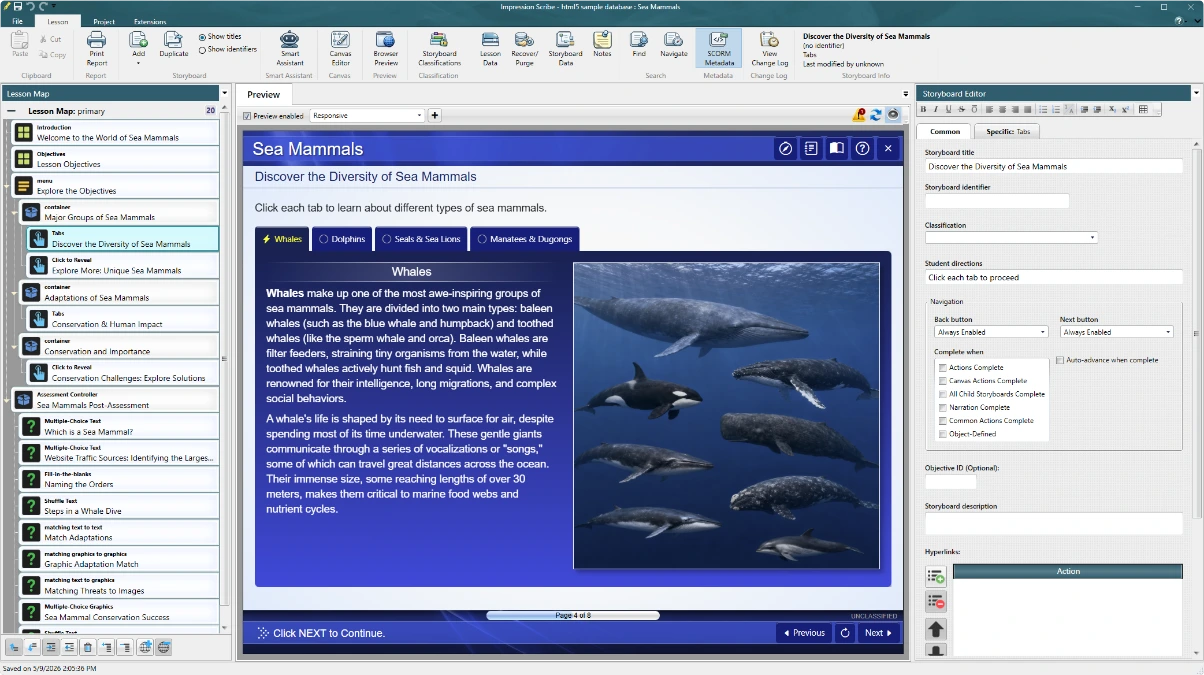
Build lessons, assessments, branching, media layouts, and simulations in a visual environment designed around instructional structure.
Explore Impression Scribe →
One connected learning ecosystem
Impression Smart Studio is an eLearning authoring and delivery ecosystem that brings structured courseware, intelligent assistance, and a flexible Courseware Engine together so content, presentation, and behavior remain one coherent system.
More than an authoring tool
Smart Studio keeps instructional structure separate from presentation while connecting every stage through a common, portable content model.
Build lessons, assessments, branching, media layouts, and simulations in a visual environment designed around instructional structure.
Explore Impression Scribe →Research, draft, revise, generate supporting imagery, and create or modify complete Storyboards and lessons without leaving the authoring context.
Explore AI integration →Use the standard player or tailor presentation, interactions, navigation, scoring, and LMS communication for the project.
Explore delivery →Built around your content
Smart Studio stores instructional content in an open XML structure. That durable source can move through different viewers, projects, and delivery requirements without locking the course to one visual treatment.
“Create, don't customize.”Shape the Courseware Engine around the learning requirement.
Human-readable XML keeps content portable and inspectable.
Objectives, Storyboards, interactions, and remediation remain connected.
Use built-in patterns, create project-specific Courseware Engine behavior, or bring specialized applications into Scribe with Impression Connect.
Report Generator
Use the structured data created during authoring to produce documents for review, production, and quality assurance.
Report Generator turns lesson text, Storyboard information, graphics, media references, and other existing content into formatted Word documents. There is no need to re-enter the same information in a separate reporting system.
Work from the complete lesson or the active Storyboard.
Use included report definitions, customize them, or design your own.
Create Word files that can be reviewed, edited, printed, and shared.
One platform, complete workflow
Move from instructional design through production and delivery without losing the structure, standards, or specialized behavior that make the program work.
Explore structured authoring, assessment, simulation authoring, AI assistance, Impression Connect, reporting, packaging, and delivery.
View capabilities →Understand collaborative production, deployment choices, integration, migration, training, and services.
Plan for your team →Review current subscription pricing and download the Windows installer. Checkout occurs securely inside Scribe.
Get Smart Studio →Tell us about your production environment, delivery requirements, and timeline. We can help identify the right path.